What is the AI Image Generator Feature?
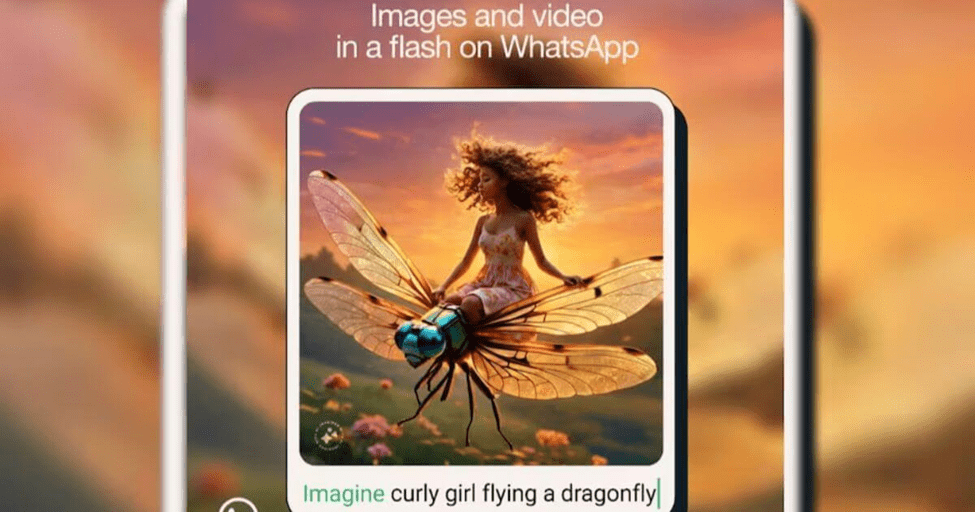
WhatsApp now lets users tap into Meta AI directly from the message box, transforming simple text into AI-generated image content through prompts. This system works across group chat and individual chat settings, making image generation accessible within everyday WhatsApp app interactions. The feature eliminates dependence on external tools or premium subscriptions, bringing creative tools into native app integration. Meta’s approach here democratizes access to what were once standalone AI generators, putting Imagine capabilities right where people already message each other.
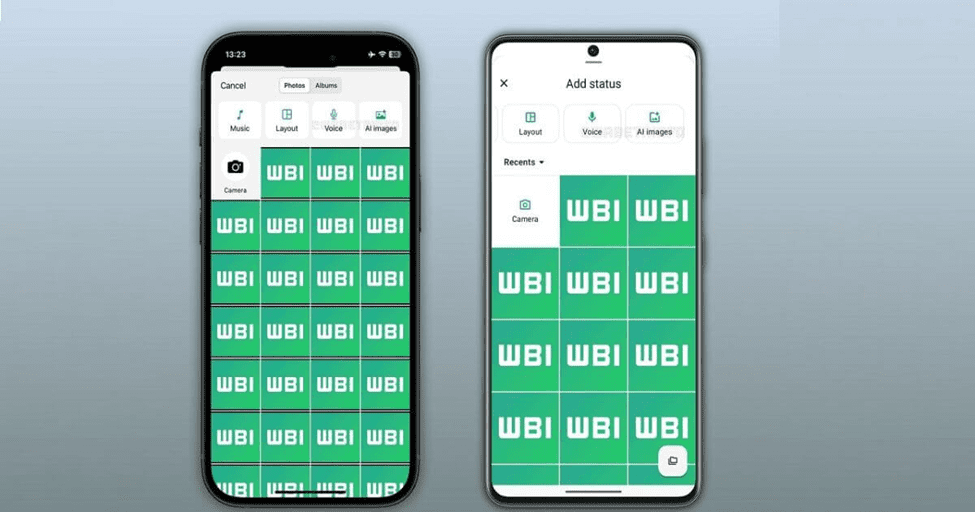
Beyond basic chat, the tool extends into WhatsApp status creation through the Updates tab, where contacts see your AI Images alongside traditional photos and short videos. Select from multiple generated variations of any scene, then customize with stickers, drawings, or cropping tools before posting your status update. The attachment menu (that paperclip symbol near your chat window) now includes AI options, making content generators feel less like innovative additions and more like standard WhatsApp functionality. This integration into status updates represents Meta’s extensive plan to weave generative AI through its platforms without requiring users to learn new interfaces.
WhatsApp Refine Your Images with Follow-Up Prompts
Personalization reaches new heights when you tap the Edit option after your first generate attempt. The ability to modify visuals—make buildings taller, add flying cars, or enhance atmospheric elements—transforms generic outputs into personalized masterpieces. This iterative process ensures your Status reflects specific intentions rather than settling for close approximations.
Navigate back through the window where your generated image awaits refined adjustments using text commands. Type instructions like “add custom elements” or “enhance lighting at dusk” to personalize further. Each reply from the system expands creative functionality, letting you scroll through variations until satisfaction peaks. The field accepts rich detail descriptions, ensuring optimal results align with your vision before you directly share or save to your phone.
Read about whatsapp How to prompt Meta AI with an image
WhatsApp Availability and Rollout
- Focuses on markets like India with high WhatsApp usage.
- Offers free Meta AI access, unlike paid tools.
- Extends AI features from Instagram and Facebook for a unified experience.
- Rolling out to Messenger through phased updates.
- Ensures a simple, seamless user experience.
- Turns chats into visual, interactive conversations.
Meta’s rollout strategy targets markets like India where the platform remains widely used for day-to-day interactions. The update brings free access to company-backed AI, offering significant value without paid subscriptions like ChatGPT or Gemini. Earlier this year, Instagram and Facebook received similar tools, creating an ecosystem for unified storytelling.
The phased extension now reaches Messenger and continues testing phase implementations across regions. Meta has effectively implemented this decision to simplify user experience, making assistants instantly accessible. Users often remain unaware how seamlessly image tools connect through their existing communication habits, transforming casual chats into engaging visual exchanges.
How to Use the AI Image Generator (Step-by-Step Guide)
- 1. Update WhatsApp to the latest version.
- 2. Open the Status tab.
- 3. Tap “AI Image” or “Imagine.”
- 4. Enter a text prompt (e.g., sunset on the beach).
- 5. Wait for the AI to generate your image.
- 6. Preview and edit if needed.
- 7. Tap “Share” to post it as your status.
- 8. Optionally, save or send the image in chats.
Open WhatsApp and navigate to the Status tab where you’ll find the AI Image Generator embedded directly. Type prompts describing your vision — perhaps a foggy morning across mountains or a futuristic cityscape glowing under a neon skyline at night. The feature generates multiple visual options instantly, allowing you to preview and select your preferred artistic flair. Customize further by adding emojis, stickers, or text before posting to your Status for 24 hours.
This AI-created images tool acts like a personal artist at your fingertips, transforming your input descriptions into realistic visuals — no premium subscriptions or external tools needed. Whether illustrating moods for a serene beach at sunset or expressing feelings through a vintage café interior bathed in starry sky light, it democratizes access to creative tools.
The Imagine feature leverages Meta’s advanced AI image generation model to visualize thoughts and moments with originality, offering expressive and visually engaging content that goes beyond existing photos and videos. Simply command your wildest imaginings into existence, embedding themes that simplify user experience and illustrate ideas with generative AI precision.
Why Meta AI’s Integration into WhatsApp Matters
- Transforms communication with visual creativity for billions.
- Generates custom wallpapers directly in chats — no external apps needed.
- Offers realistic, themed backgrounds.
- Eliminates third-party tools.
- Supports style refinement through iterative editing.
- Positions WhatsApp as a creative platform, not just messaging.
- Limited rollout for selected regions and users.
- Updates coming to Android and iOS soon.
- Requires latest app version for activation.
- Global release to follow after testing and stability checks.
Meta AI’s integration transforms how billions communicate through visual creativity. This deployment marks a shift where customized backgrounds become accessible without external apps. Users can now generate themed wallpapers directly within chats, from snowy mountains to futuristic city skyline scenes. The feature eliminates dependency on third-party wallpaper generator tools while maintaining real themes. Testing shows accuracy in refining style preferences through iterative editing. Meta’s strategy positions WhatsApp as a complete creative facility rather than just messaging.
Availability begins with a limited number of users across specific regions during this rollout phase. Android and iOS platforms receive updates in coming weeks, though full launch date remains officially announced but not confirmed. The server-side activation requires the latest version installed on devices. Ongoing stability checks ensure responsiveness before broader release reaches globally. Few accounts see the option immediately, as eligibility depends on region and account type. This underway rollout will expand through broader testing phase over days.
A Competitive Edge over Other AI Tools
| Feature | WhatsApp / Meta AI | Other AI Tools | Competitive Edge |
| Built-in Access | Integrated within WhatsApp | Requires separate app | Seamless use & sharing |
| Ease of Sharing | Direct to chats or Status | Manual upload needed | Faster and simpler |
| Prompt-to-Image | Generates instantly in chat | Needs external platform | Quick, real-time creation |
| Editing Options | Edit, animate, or analyze images | Limited to static edits | More versatile features |
| User Familiarity | Uses existing WhatsApp interface | New app learning required | Easy adoption |
| Purpose Focus | Social and casual sharing | General image generation | Tailored for social media |
| Ecosystem Integration | Works across Meta apps | Usually stand-alone | Smooth cross-platform use |
WhatsApp’s AI image generator stands apart through seamless integration within an existing communication platform users already trust. Unlike standalone tools requiring separate downloads, this feature eliminates friction by embedding creative capabilities directly into daily messaging workflows. The accessibility factor transforms casual users into content creators without demanding technical expertise or additional app clutter.
Meta’s strategic positioning leverages WhatsApp’s massive user base to democratize AI-powered visual content creation at unprecedented scale. Competitors offer similar functionality, but none match the convenience of generating images where billions already communicate. This native experience creates competitive advantage through reduced barriers, making sophisticated AI technology feel effortless rather than intimidating for everyday users.
Part of Meta’s Broader AI Integration Strategy
Meta’s ambitious strategy positions WhatsApp as a central hub for AI-powered innovations beyond simple messaging. The integration transforms how users interact with artificial intelligence, making advanced technology accessible through familiar interfaces. This move reflects Meta’s vision to embed AI capabilities across its entire ecosystem of platforms. WhatsApp’s massive user base provides the perfect testing ground for rolling out generative AI tools that could reshape digital communication patterns. The feature isn’t just about image creation; it’s about establishing WhatsApp as an AI-first application. Meta aims to compete directly with standalone AI services by offering seamless access within existing apps. This strategy enhances user engagement while keeping people within Meta’s digital environment. By introducing AI image generation for Status updates, Meta demonstrates its commitment to practical AI applications that serve everyday needs. The company understands that convenience and integration matter more than standalone features. WhatsApp’s transformation into an AI-powered platform signals Meta’s broader ambitions in the competitive AI landscape.
WhatsApp Other Features Being Tested
Meta is experimenting with a tool that allows users to share generated visuals across languages, breaking communication barriers. This advantage creates a user-friendly design where changes and enhancements become seamless through context-aware adjustments. The original instruction gets refined automatically based on user preferences.
Currently, a few subset of participants are tested across different app versions before any wider release happens. Meta plans to add more labeled icon options for easier navigation. Users can pick from a bunch of styles, choose their preferred format, and send creations instantly.
Frequently Asked Questions (FAQs)
Does WhatsApp have an AI image generator?
Yes, WhatsApp now includes a Meta AI image generator that lets users create images from text prompts for chats and Status updates. The feature is gradually rolling out to select regions.
Can I turn off AI in WhatsApp?
Currently, you can’t fully disable Meta AI, but you can ignore or hide the AI chat shortcut by not engaging with it or clearing the conversation.
How do I activate the AI feature on WhatsApp?
To activate, update WhatsApp to the latest version and look for the Meta AI or Imagine option in the chat bar or Status section (available only where the rollout has reached).
How do I turn off Meta AI?
You can’t completely turn it off, but you can mute, hide, or delete the AI chat to limit its visibility and prevent accidental use.
Is WhatsApp AI safe?
Yes, it’s secure and encrypted under WhatsApp’s privacy policy. Prompts and responses are processed safely through Meta’s servers.
Why is AI showing in WhatsApp?
The AI option appears because Meta has integrated its assistant and image generator into WhatsApp to enhance user creativity and support.
How does WhatsApp make money?
WhatsApp earns mainly through WhatsApp Business services, API fees, and integration tools used by companies for marketing and customer support.
In which countries is WhatsApp Meta AI available?
Meta AI in WhatsApp is currently available in limited regions, including the U.S., India, and select countries, with a wider rollout planned soon.
Conclusion
WhatsApp’s AI image generator feature represents a pivotal moment where Meta AI integration transforms casual Status updates into creative expressions. Users can now imagine scenarios like a tiny astronaut in a helmet floating through space beside a cat, or a cozy coffee shop with rain outside overlooking a sunset sea and city landscape. Open WhatsApp, Start experimenting, Enter descriptive prompts, and publish instantly—the Icon gets added automatically, ready to Share. This engaging tool encourages users to add question prompts for answers, creating separate question threads that connect through username tags, while search functionality and feedback mechanisms prove genuinely helpful at enhancing user experience in English, Hindi, and beyond.
Keep Reading – More Blogs Await You Here!
Nala Ray Net Worth: Shocking $5-10 Million Fortune
Jim Adler Net Worth: Texas Hammer’s $10 Million Empire
Elon Musk Net Worth Hits Massive $489.9 Billion Mark

Fatima Khan is a seasoned technology journalist with 6+ years of experience covering consumer electronics, mobile devices, laptops, and emerging technology trends. Specializes in comprehensive smartphone reviews, laptop performance testing, gaming hardware analysis, and consumer electronics evaluation. Has extensively covered flagship phone launches, budget laptop comparisons, wearable technology, smart home devices, and audio equipment reviews.
Additionally covers software development trends, programming languages, coding tutorials, app reviews, and developer tools. Provides insights on software updates, mobile app testing, development frameworks, and tech industry analysis for both consumers and developers.